Model evaluations
Benchmark several models on your own data, one job each, with their scores side by side.

Experiment-first MLOps for researchers and developers
Run your AI and ML experiments and data processing workloads on accelerated cloud compute with one command.
kaio run ./tool-calling -e finetune.py --workflow training -i ml.g4dn.xlarge
Every job, live on your Kaio dashboard.
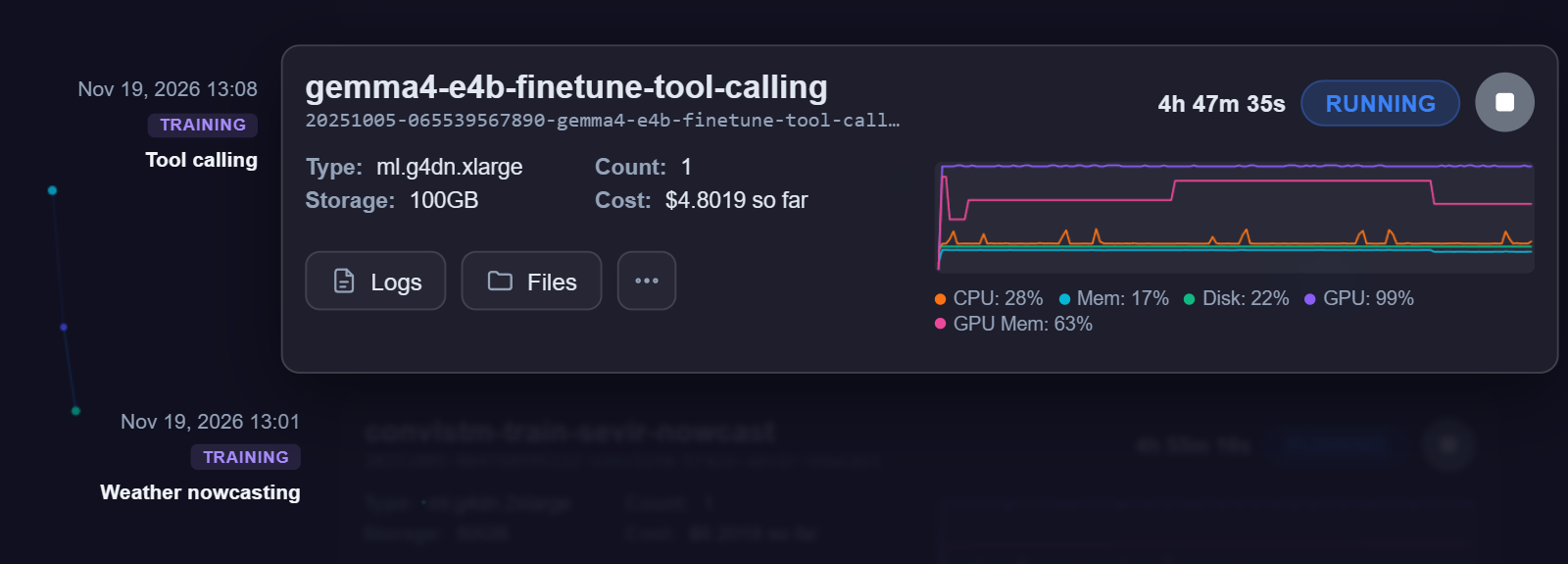
Run several experiments at once, with nothing left open while they run.
Give your multiprocessing pool loops the cores they need.
Power model training and fine-tuning with accelerated compute.
Machines are spun up for each job and torn down when it's done, so there are no idle machines on your bill.
48 GB
per GPU, 1 or 4 a machine
Up to 48 vCPUs · 384 GB RAM
ml.g6e24 GB
one GPU a machine
4 vCPUs · 16 GB RAM
ml.g616 GB
per GPU, 1 or 4 a machine
Up to 48 vCPUs · 192 GB RAM
ml.g4dn32 vCPUs
on the largest machine
4 GB RAM per vCPU, up to 128 GB
ml.m5 · ml.m6i32 vCPUs
on the largest machine
2 GB RAM per vCPU, up to 64 GB
ml.c5 · ml.c6i512 GB RAM
on the largest machine
8 GB per vCPU, up to 64 vCPUs
ml.r8iSome machines depend on your plan and your project's region.
Prepare the data, train, evaluate and serve. Each step is a job, and each job's outputs are ready for the next one.
A folder with your scripts or notebooks and a requirements.txt; data comes from a Kaio dataset or wherever it already lives. No cloud setup, no rewrite. It runs on Kaio's runtime with your requirements installed as they are, or in your own container image.
tool-calling/
├── preprocess.py
├── finetune.py
├── evaluate.ipynb
└── requirements.txtOne call sends the job's folder to cloud CPUs or GPUs, where it runs unattended for up to 48 hours. One job per model or setting, ready to compare when they finish. A run is just the job's folder, its requirements and the machine you chose, and each job records the runtime it ran on, so you can repeat it the same way.
for rank in [8, 16, 32]:
    client.submit_job(
        job_dir="./tool-calling",
        job_name=f"gemma4-lora-r{rank}",
        workflow="training",
        instance_type="ml.g4dn.xlarge",
        entrypoint="finetune.py",
        env={"LORA_RANK": str(rank)},
)Logs stream to your dashboard as they're written, beside each job's CPU, GPU and memory, so you'll know it's working, or why it isn't. Every job keeps its run time and GPU use, ready to compare with the same job on a bigger machine.
All your jobs stay inside your budget.
Deploy what a job produced, your own model or an open model with one call, and call it from any app. Open chat models come with an OpenAI-compatible API.
client.deploy(job=best["unique_job_name"],
              name="tool-caller", serve="./serving")
client.predict("tool-caller",
{"prompt": "Flag anomalies in sensor 12's temperature over the last 7 days"})Benchmark several models on your own data, one job each, with their scores side by side.
Adapt an open language, speech or vision model to your domain on cloud GPUs, with checkpoints along the way.
Score a whole dataset with a trained model, split across machines, and download the results.
Clean, join and engineer features on data too big for a notebook session, then keep it as a dataset.
Try settings and machines in parallel, each run with its own logs and metrics.
Put a model behind an endpoint for an app, a demo or a partner. It switches itself off when nobody's calling.
Every job is one call to submit_job. Choose the workflow that fits the work, and Kaio runs your code on the instances you ask for, streams its logs and metrics to your dashboard, and hands back what it produced.
Processing jobs take a Python script or a notebook, run it on cloud CPUs or GPUs, and return what it produced. They suit the work around your models: preparing and cleaning data, engineering features, evaluating a model, or scoring a dataset with one.
Kaio packages the job's folder, installs its requirements.txt on the instance and runs the entrypoint at its top. The job keeps running in the cloud while you carry on working.
result = client.submit_job(
    job_dir="./sevir-nowcast",
    job_name="sevir-prep-vil-sequences",
    workflow="processing",
    entrypoint="prep_sequences.py",
)Ask for several instances and each runs your script on its own share of the data. Every instance knows which one it is, so your code can pick its rows.
# submitted with instance_count=4
hosts = os.environ["SM_HOSTS"].split(",")
rank = hosts.index(os.environ["SM_CURRENT_HOST"])
my_rows = dataset[rank::len(hosts)]Point the job at an .ipynb file and every cell runs top to bottom on the instance. The executed notebook comes back with its outputs, charts included.
client.submit_job(
    job_dir="./notebooks",
    workflow="processing",
    entrypoint="analysis.ipynb",
)Files your code creates or changes are kept as the job's output; your own code isn't copied back. Download them with one call or from the dashboard.
files = client.download_output(
    result["unique_job_name"], "./results"
)
Training jobs are for fitting models, usually on GPUs. They run your code the same way as processing jobs, and add what long runs need: checkpoints that survive an interruption, and spot capacity at AWS's discount.
Your code runs on Kaio's runtime, with your requirements.txt on top.
result = client.submit_job(
    job_dir="./sevir-nowcast",
    job_name="convlstm-train-sevir-nowcast",
    workflow="training",
    instance_type="ml.g4dn.xlarge",
    entrypoint="train_convlstm.py",
)Anything your code writes to /opt/ml/checkpoints is saved while the job runs. Load the latest checkpoint at the start, and a restarted job carries on where it stopped.
ckpt = "/opt/ml/checkpoints/model.pt"
if os.path.exists(ckpt):
    model.load_state_dict(torch.load(ckpt))
for epoch in range(epochs):
    train_one_epoch(model)
torch.save(model.state_dict(), ckpt)Train models at AWS's spot discount, paying only for the time AWS bills. The saving comes from AWS's spare capacity, so a spot job may wait to start or be interrupted, and it picks up again from your checkpoints.
client.submit_job(
    job_dir="./sevir-nowcast",
    workflow="training",
    instance_type="ml.g4dn.xlarge",
    training_args={"spot_instances": {
        "enabled": True, "max_wait": 7200,
    }},
)When the job finishes, the files your code wrote come back packed as model.tar.gz, ready to download alongside the job's logs.
files = client.download_output(
    result["unique_job_name"], "./model"
)Thanks, your message is on its way. We'll reply to .